
This feature is available only with paid Kochava accounts. Contact us to learn more.
Kochava provides a manual upload process for Media Partners that do not have an API.
Cost Configuration User Interface
- Log in to Kochava.
- Select the desired Account.
- Select Cost > Configuration.
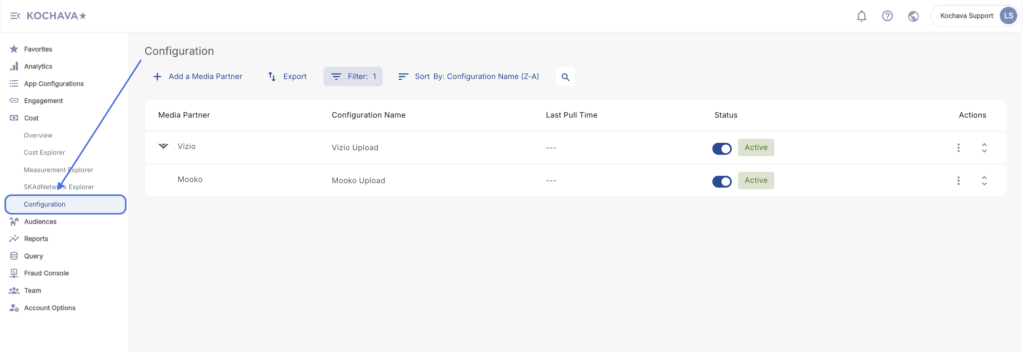
Creating a Manual Upload Configuration
- Click + Add a Media Partner.
- Select the desired Media Partner.
- Enter the Configuration Name.
- Select
- This box will appear where you can drag and drop your CSV file to upload.
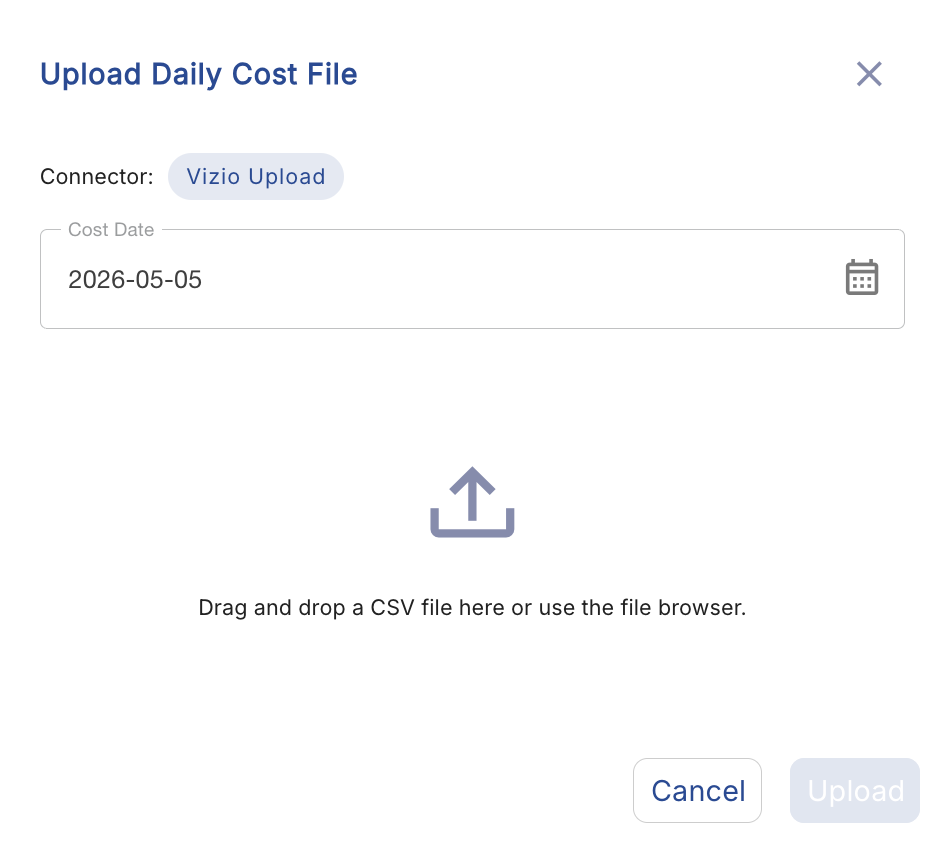
- This box will appear where you can drag and drop your CSV file to upload.
- Select the Time Zone.
- Select the desired Currency.
- Enter the desired email address for Notifications.
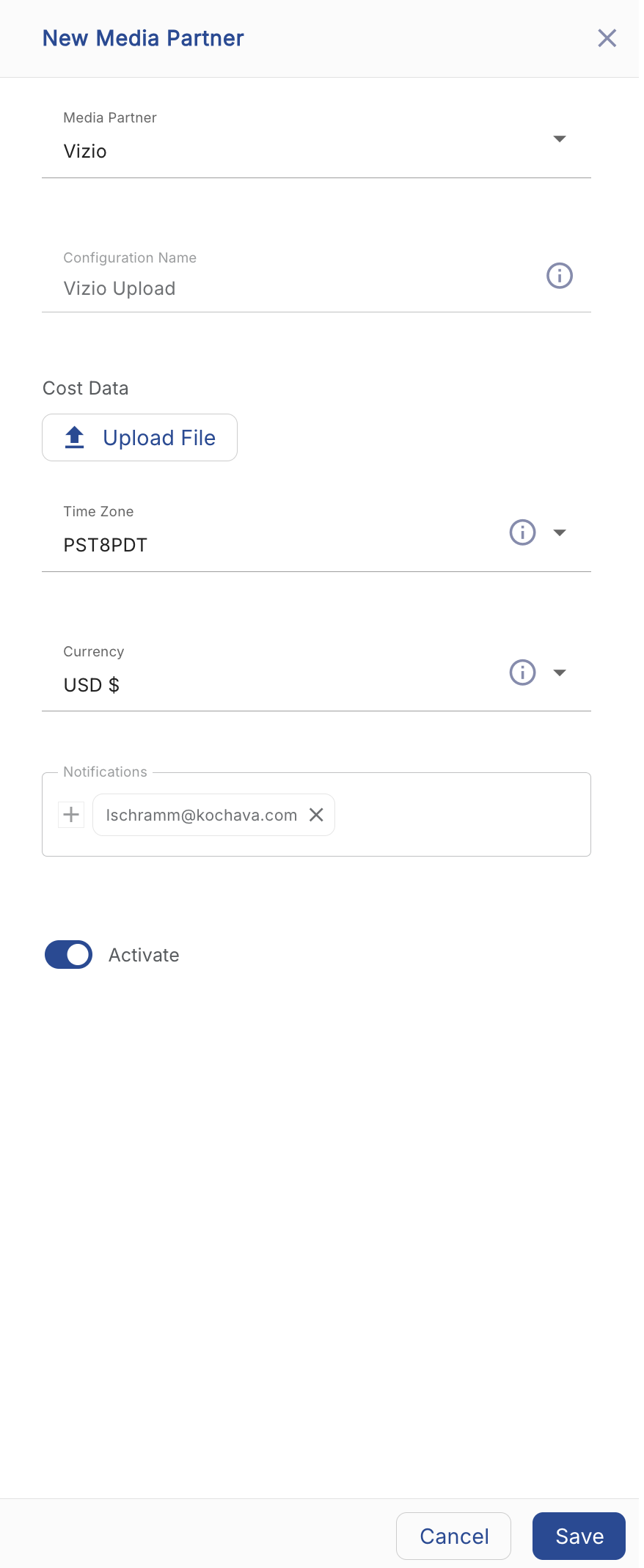
- Click Save.
Manual Upload File Example
| Date | App | Campaign ID | Campaign Name | Platform | Country | Impressions | Clicks | Installs | Spend |
| 05-05-2026 | Kochava Support Android Demo | 123456789ER | test_US-UK-DE | iOS | US | 1637776 | 14623 | 2 | 2.1 |
| 05-05-2026 | Kochava Support Android Demo | 123456789ER | test_US-UK-DE | iOS | UK | 982341 | 9812 | 1 | 1.5 |
| 05-05-2026 | Kochava Support Android Demo | 123456789ER | test_US-UK-DE | iOS | DE | 754210 | 6543 | 1 | 1.2 |
| 05-05-2026 | Kochava Support Android Demo | 987654321AB | test_US-CA-AU | Android | US | 2105432 | 18234 | 5 | 4.8 |
| 05-05-2026 | Kochava Support Android Demo | 987654321AB | test_US-CA-AU | Android | CA | 643120 | 5321 | 1 | 0.9 |
| 05-05-2026 | Kochava Support Android Demo | 987654321AB | test_US-CA-AU | Android | AU | 521900 | 4102 | 1 | 0.8 |
| 05-05-2026 | Kochava Support iOS Demo | 112233445BC | test_FR-ES-IT | iOS | FR | 891200 | 7843 | 3 | 3.2 |
| 05-05-2026 | Kochava Support iOS Demo | 112233445BC | test_FR-ES-IT | iOS | ES | 672300 | 5920 | 2 | 2.4 |
| 05-05-2026 | Kochava Support iOS Demo | 112233445BC | test_FR-ES-IT | iOS | IT | 543100 | 4810 | 1 | 1.7 |
| 05-05-2026 | Kochava Support iOS Demo | 556677889CD | test_JP-KR-SG | Android | JP | 1234560 | 11230 | 4 | 5.1 |
| 05-05-2026 | Kochava Support iOS Demo | 556677889CD | test_JP-KR-SG | Android | KR | 987430 | 8764 | 3 | 3.9 |
| 05-05-2026 | Kochava Support iOS Demo | 556677889CD | test_JP-KR-SG | Android | SG | 412300 | 3210 | 1 | 1.1 |
| 05-06-2026 | Kochava Support Android Demo | 123456789ER | test_US-UK-DE | iOS | US | 1701234 | 15002 | 3 | 2.8 |
| 05-06-2026 | Kochava Support Android Demo | 123456789ER | test_US-UK-DE | iOS | UK | 1023450 | 10341 | 2 | 1.9 |
| 05-06-2026 | Kochava Support Android Demo | 123456789ER | test_US-UK-DE | iOS | DE | 812300 | 7120 | 1 | 1.3 |
| 05-06-2026 | Kochava Support Android Demo | 987654321AB | test_US-CA-AU | Android | US | 2231000 | 19450 | 6 | 5.2 |
| 05-06-2026 | Kochava Support Android Demo | 987654321AB | test_US-CA-AU | Android | CA | 710200 | 6130 | 2 | 1.4 |
| 05-06-2026 | Kochava Support Android Demo | 987654321AB | test_US-CA-AU | Android | AU | 589000 | 4870 | 1 | 1 |
| 05-06-2026 | Kochava Support iOS Demo | 112233445BC | test_FR-ES-IT | iOS | FR | 934500 | 8210 | 4 | 3.6 |
| 05-06-2026 | Kochava Support iOS Demo | 112233445BC | test_FR-ES-IT | iOS | ES | 701000 | 6340 | 2 | 2.6 |
| 05-06-2026 | Kochava Support iOS Demo | 112233445BC | test_FR-ES-IT | iOS | IT | 578900 | 5100 | 2 | 1.9 |
| 05-06-2026 | Kochava Support iOS Demo | 556677889CD | test_JP-KR-SG | Android | JP | 1312000 | 11980 | 5 | 5.7 |
| 05-06-2026 | Kochava Support iOS Demo | 556677889CD | test_JP-KR-SG | Android | KR | 1043200 | 9120 | 3 | 4.2 |
| 05-06-2026 | Kochava Support iOS Demo | 556677889CD | test_JP-KR-SG | Android | SG | 453100 | 3640 | 1 | 1.3 |
| 05-07-2026 | Kochava Support Android Demo | 123456789ER | test_US-UK-DE | iOS | US | 1589000 | 14010 | 2 | 2 |
| 05-07-2026 | Kochava Support Android Demo | 123456789ER | test_US-UK-DE | iOS | UK | 945000 | 9200 | 1 | 1.4 |
| 05-07-2026 | Kochava Support Android Demo | 123456789ER | test_US-UK-DE | iOS | DE | 723000 | 6200 | 1 | 1.1 |
| 05-07-2026 | Kochava Support Android Demo | 987654321AB | test_US-CA-AU | Android | US | 2050000 | 17800 | 4 | 4.5 |
| 05-07-2026 | Kochava Support Android Demo | 987654321AB | test_US-CA-AU | Android | CA | 620000 | 5100 | 1 | 0.8 |
| 05-07-2026 | Kochava Support Android Demo | 987654321AB | test_US-CA-AU | Android | AU | 503000 | 3900 | 1 | 0.7 |
| 05-07-2026 | Kochava Support iOS Demo | 112233445BC | test_FR-ES-IT | iOS | FR | 870000 | 7600 | 3 | 3 |
| 05-07-2026 | Kochava Support iOS Demo | 112233445BC | test_FR-ES-IT | iOS | ES | 651000 | 5700 | 2 | 2.2 |
| 05-07-2026 | Kochava Support iOS Demo | 112233445BC | test_FR-ES-IT | iOS | IT | 521000 | 4600 | 1 | 1.6 |
| 05-07-2026 | Kochava Support iOS Demo | 556677889CD | test_JP-KR-SG | Android | JP | 1198000 | 10800 | 4 | 4.9 |
| 05-07-2026 | Kochava Support iOS Demo | 556677889CD | test_JP-KR-SG | Android | KR | 960000 | 8400 | 3 | 3.7 |
| 05-07-2026 | Kochava Support iOS Demo | 556677889CD | test_JP-KR-SG | Android | SG | 398000 | 3050 | 1 | 1 |
| 05-08-2026 | Kochava Support Android Demo | 223344556EF | test_BR-MX-AR | Android | BR | 1845000 | 16400 | 5 | 4.2 |
| 05-08-2026 | Kochava Support Android Demo | 223344556EF | test_BR-MX-AR | Android | MX | 1023000 | 9100 | 2 | 1.8 |
| 05-08-2026 | Kochava Support Android Demo | 223344556EF | test_BR-MX-AR | Android | AR | 612000 | 5400 | 1 | 1 |
| 05-08-2026 | Kochava Support iOS Demo | 334455667GH | test_IN-ID-PH | iOS | IN | 2341000 | 20100 | 7 | 6.1 |
| 05-08-2026 | Kochava Support iOS Demo | 334455667GH | test_IN-ID-PH | iOS | ID | 1120000 | 9800 | 3 | 2.9 |
| 05-08-2026 | Kochava Support iOS Demo | 334455667GH | test_IN-ID-PH | iOS | PH | 734000 | 6300 | 2 | 1.5 |
| 05-08-2026 | Kochava Support Android Demo | 123456789ER | test_US-UK-DE | iOS | US | 1724000 | 15300 | 3 | 2.9 |
| 05-08-2026 | Kochava Support Android Demo | 123456789ER | test_US-UK-DE | iOS | UK | 1056000 | 10600 | 2 | 2 |
| 05-08-2026 | Kochava Support Android Demo | 123456789ER | test_US-UK-DE | iOS | DE | 841000 | 7400 | 1 | 1.4 |
| 05-08-2026 | Kochava Support Android Demo | 987654321AB | test_US-CA-AU | Android | US | 2278000 | 19900 | 6 | 5.5 |
| 05-08-2026 | Kochava Support Android Demo | 987654321AB | test_US-CA-AU | Android | CA | 731000 | 6400 | 2 | 1.6 |
| 05-08-2026 | Kochava Support Android Demo | 987654321AB | test_US-CA-AU | Android | AU | 601000 | 5000 | 1 | 1.1 |
Google Sheet Upload:
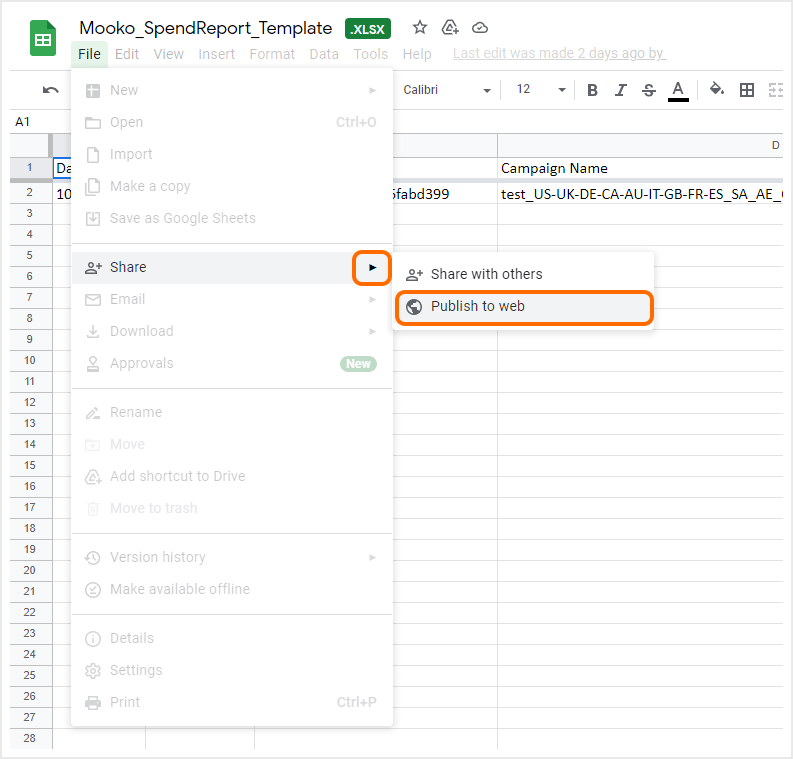
The manual upload process may also be completed utilizing Google Sheets.
- Open the desired Google Sheet.
- Click File > Share > Publish to web.
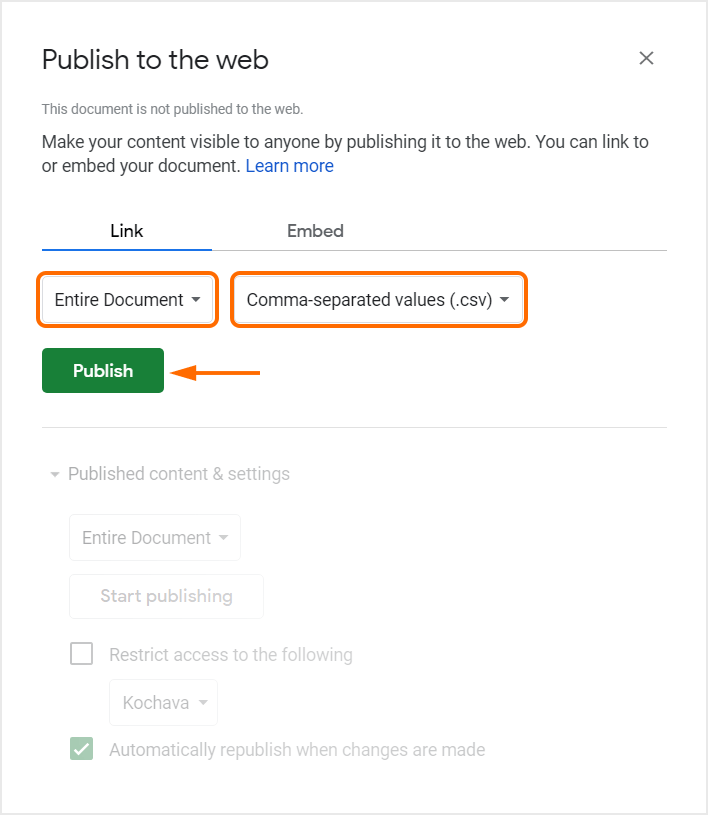
- Select to share the Entire Document.
- Select Comma-separated values (.csv) as the format.
- Click Publish.
- A pop-up message will be displayed stating “Are you sure you want to publish this selection?” Click OK.
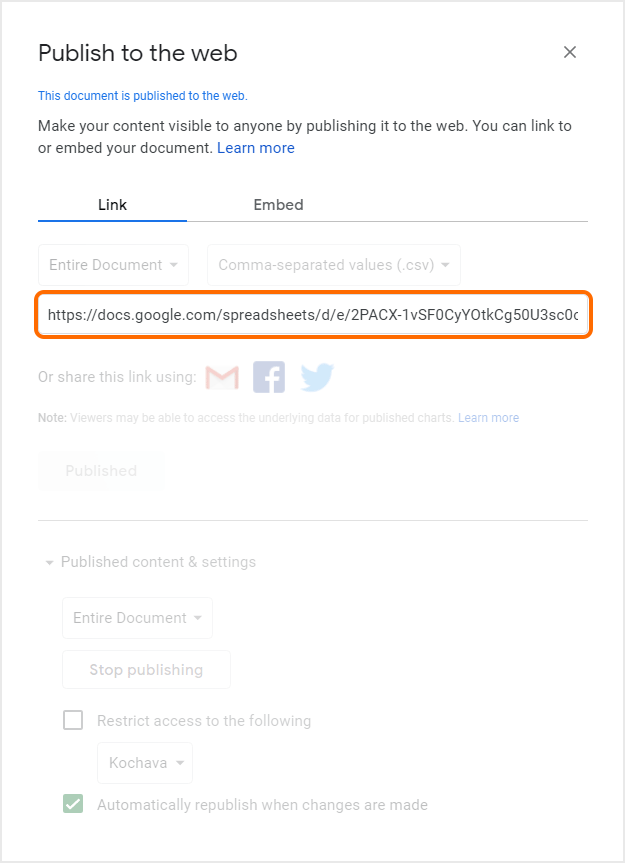
- Copy the provided link and paste into the Kochava UI as shown above.
Uploading Additional Files:
To add additional files after the initial upload:
- Click on the Configuration Edit (⋮) button.
- Click Upload New File.
- Follow the procedures from the upload process above.
Daily Cost Data Ingestion
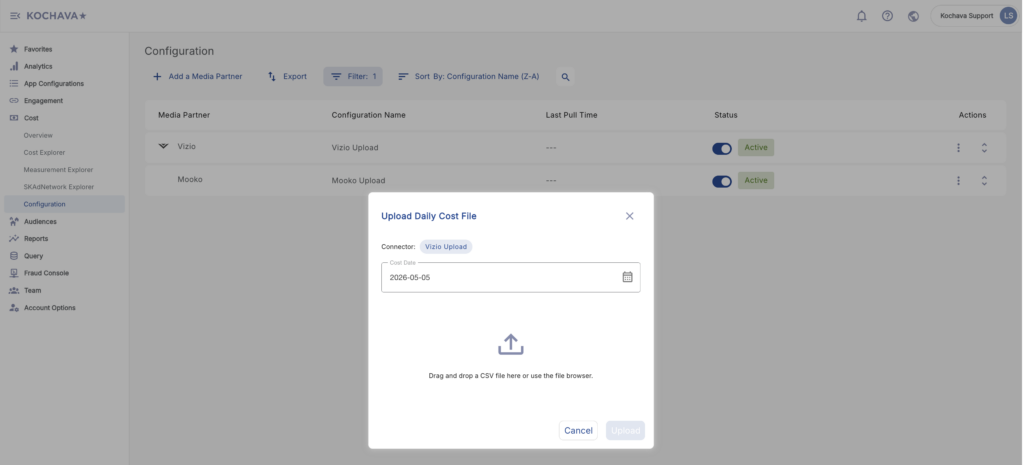
This option is designed for ongoing, day-to-day cost reporting through a CSV file upload.
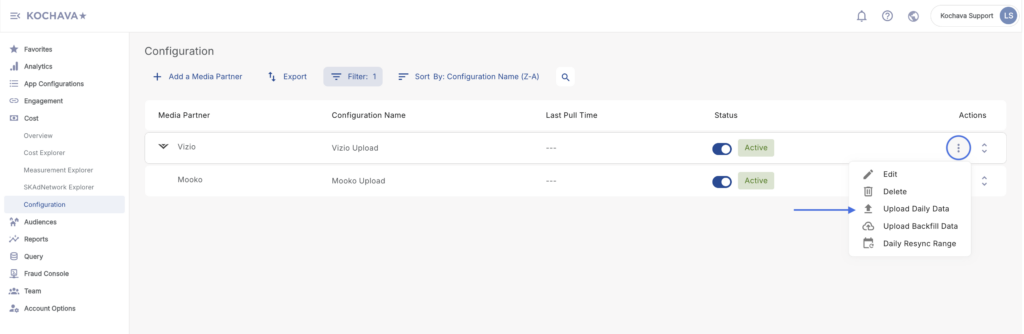
- Click on the Configuration Edit (⋮) button for the desired media partner.
- Select Upload Daily Data.
- Select specific Date.
- Drag and drop a date-specific CSV file (format: YYYY-MM-DD.csv)
- Once uploaded, the file is automatically queued and scheduled for processing.
Historical Data Ingestion (Backfill)
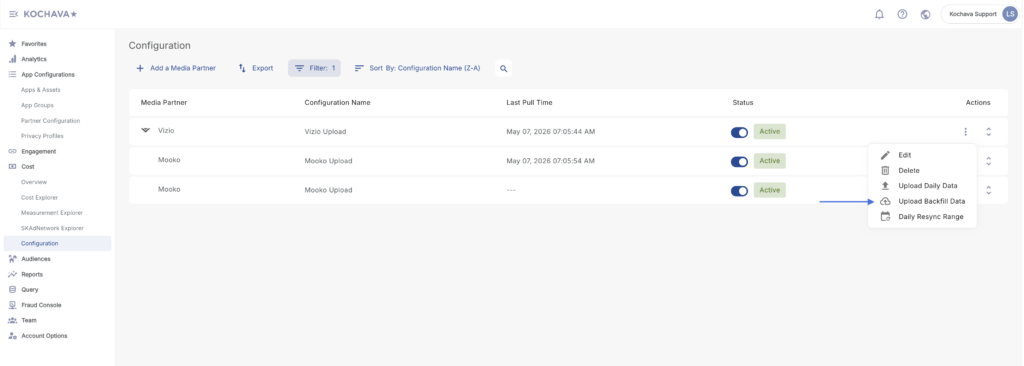
This option is designed for media partners that have historical cost data that needs to be backfilled.
- Click on the Configuration Edit (⋮) button for the desired media partner.
- Select Upload Backfill Data.
- Drag and drop a date-specific CSV file (format: YYYY-MM-DD.csv)
Manual Upload File Example
| Date | App | Campaign ID | Campaign Name | Platform | Country | Impressions | Clicks | Installs | Spend |
| 05-05-2026 | Kochava Support Android Demo | 123456789ER | test_US-UK-DE | iOS | US | 1637776 | 14623 | 2 | 2.1 |
| 05-05-2026 | Kochava Support Android Demo | 123456789ER | test_US-UK-DE | iOS | UK | 982341 | 9812 | 1 | 1.5 |
| 05-05-2026 | Kochava Support Android Demo | 123456789ER | test_US-UK-DE | iOS | DE | 754210 | 6543 | 1 | 1.2 |
| 05-05-2026 | Kochava Support Android Demo | 987654321AB | test_US-CA-AU | Android | US | 2105432 | 18234 | 5 | 4.8 |
| 05-05-2026 | Kochava Support Android Demo | 987654321AB | test_US-CA-AU | Android | CA | 643120 | 5321 | 1 | 0.9 |
| 05-05-2026 | Kochava Support Android Demo | 987654321AB | test_US-CA-AU | Android | AU | 521900 | 4102 | 1 | 0.8 |
| 05-05-2026 | Kochava Support iOS Demo | 112233445BC | test_FR-ES-IT | iOS | FR | 891200 | 7843 | 3 | 3.2 |
| 05-05-2026 | Kochava Support iOS Demo | 112233445BC | test_FR-ES-IT | iOS | ES | 672300 | 5920 | 2 | 2.4 |
| 05-05-2026 | Kochava Support iOS Demo | 112233445BC | test_FR-ES-IT | iOS | IT | 543100 | 4810 | 1 | 1.7 |
| 05-05-2026 | Kochava Support iOS Demo | 556677889CD | test_JP-KR-SG | Android | JP | 1234560 | 11230 | 4 | 5.1 |
| 05-05-2026 | Kochava Support iOS Demo | 556677889CD | test_JP-KR-SG | Android | KR | 987430 | 8764 | 3 | 3.9 |
| 05-05-2026 | Kochava Support iOS Demo | 556677889CD | test_JP-KR-SG | Android | SG | 412300 | 3210 | 1 | 1.1 |
| 05-06-2026 | Kochava Support Android Demo | 123456789ER | test_US-UK-DE | iOS | US | 1701234 | 15002 | 3 | 2.8 |
| 05-06-2026 | Kochava Support Android Demo | 123456789ER | test_US-UK-DE | iOS | UK | 1023450 | 10341 | 2 | 1.9 |
| 05-06-2026 | Kochava Support Android Demo | 123456789ER | test_US-UK-DE | iOS | DE | 812300 | 7120 | 1 | 1.3 |
| 05-06-2026 | Kochava Support Android Demo | 987654321AB | test_US-CA-AU | Android | US | 2231000 | 19450 | 6 | 5.2 |
| 05-06-2026 | Kochava Support Android Demo | 987654321AB | test_US-CA-AU | Android | CA | 710200 | 6130 | 2 | 1.4 |
| 05-06-2026 | Kochava Support Android Demo | 987654321AB | test_US-CA-AU | Android | AU | 589000 | 4870 | 1 | 1 |
| 05-06-2026 | Kochava Support iOS Demo | 112233445BC | test_FR-ES-IT | iOS | FR | 934500 | 8210 | 4 | 3.6 |
| 05-06-2026 | Kochava Support iOS Demo | 112233445BC | test_FR-ES-IT | iOS | ES | 701000 | 6340 | 2 | 2.6 |
| 05-06-2026 | Kochava Support iOS Demo | 112233445BC | test_FR-ES-IT | iOS | IT | 578900 | 5100 | 2 | 1.9 |
| 05-06-2026 | Kochava Support iOS Demo | 556677889CD | test_JP-KR-SG | Android | JP | 1312000 | 11980 | 5 | 5.7 |
| 05-06-2026 | Kochava Support iOS Demo | 556677889CD | test_JP-KR-SG | Android | KR | 1043200 | 9120 | 3 | 4.2 |
| 05-06-2026 | Kochava Support iOS Demo | 556677889CD | test_JP-KR-SG | Android | SG | 453100 | 3640 | 1 | 1.3 |
| 05-07-2026 | Kochava Support Android Demo | 123456789ER | test_US-UK-DE | iOS | US | 1589000 | 14010 | 2 | 2 |
| 05-07-2026 | Kochava Support Android Demo | 123456789ER | test_US-UK-DE | iOS | UK | 945000 | 9200 | 1 | 1.4 |
| 05-07-2026 | Kochava Support Android Demo | 123456789ER | test_US-UK-DE | iOS | DE | 723000 | 6200 | 1 | 1.1 |
| 05-07-2026 | Kochava Support Android Demo | 987654321AB | test_US-CA-AU | Android | US | 2050000 | 17800 | 4 | 4.5 |
| 05-07-2026 | Kochava Support Android Demo | 987654321AB | test_US-CA-AU | Android | CA | 620000 | 5100 | 1 | 0.8 |
| 05-07-2026 | Kochava Support Android Demo | 987654321AB | test_US-CA-AU | Android | AU | 503000 | 3900 | 1 | 0.7 |
| 05-07-2026 | Kochava Support iOS Demo | 112233445BC | test_FR-ES-IT | iOS | FR | 870000 | 7600 | 3 | 3 |
| 05-07-2026 | Kochava Support iOS Demo | 112233445BC | test_FR-ES-IT | iOS | ES | 651000 | 5700 | 2 | 2.2 |
| 05-07-2026 | Kochava Support iOS Demo | 112233445BC | test_FR-ES-IT | iOS | IT | 521000 | 4600 | 1 | 1.6 |
| 05-07-2026 | Kochava Support iOS Demo | 556677889CD | test_JP-KR-SG | Android | JP | 1198000 | 10800 | 4 | 4.9 |
| 05-07-2026 | Kochava Support iOS Demo | 556677889CD | test_JP-KR-SG | Android | KR | 960000 | 8400 | 3 | 3.7 |
| 05-07-2026 | Kochava Support iOS Demo | 556677889CD | test_JP-KR-SG | Android | SG | 398000 | 3050 | 1 | 1 |
| 05-08-2026 | Kochava Support Android Demo | 223344556EF | test_BR-MX-AR | Android | BR | 1845000 | 16400 | 5 | 4.2 |
| 05-08-2026 | Kochava Support Android Demo | 223344556EF | test_BR-MX-AR | Android | MX | 1023000 | 9100 | 2 | 1.8 |
| 05-08-2026 | Kochava Support Android Demo | 223344556EF | test_BR-MX-AR | Android | AR | 612000 | 5400 | 1 | 1 |
| 05-08-2026 | Kochava Support iOS Demo | 334455667GH | test_IN-ID-PH | iOS | IN | 2341000 | 20100 | 7 | 6.1 |
| 05-08-2026 | Kochava Support iOS Demo | 334455667GH | test_IN-ID-PH | iOS | ID | 1120000 | 9800 | 3 | 2.9 |
| 05-08-2026 | Kochava Support iOS Demo | 334455667GH | test_IN-ID-PH | iOS | PH | 734000 | 6300 | 2 | 1.5 |
| 05-08-2026 | Kochava Support Android Demo | 123456789ER | test_US-UK-DE | iOS | US | 1724000 | 15300 | 3 | 2.9 |
| 05-08-2026 | Kochava Support Android Demo | 123456789ER | test_US-UK-DE | iOS | UK | 1056000 | 10600 | 2 | 2 |
| 05-08-2026 | Kochava Support Android Demo | 123456789ER | test_US-UK-DE | iOS | DE | 841000 | 7400 | 1 | 1.4 |
| 05-08-2026 | Kochava Support Android Demo | 987654321AB | test_US-CA-AU | Android | US | 2278000 | 19900 | 6 | 5.5 |
| 05-08-2026 | Kochava Support Android Demo | 987654321AB | test_US-CA-AU | Android | CA | 731000 | 6400 | 2 | 1.6 |
| 05-08-2026 | Kochava Support Android Demo | 987654321AB | test_US-CA-AU | Android | AU | 601000 | 5000 | 1 | 1.1 |
Data Restatement & Resync Mechanisms
To account for late-arriving data or corrections to previously reported spend, the system supports comprehensive data restatement.
Standard Daily Restatement (≤ 7-Day Window)
- The system supports automatic cost data restatement for a maximum of 7 days from the current date.
- If updates are available within this rolling 7-day window, users simply re-upload the respective YYYY-MM-DD.csv file. The system will automatically detect the file and sync the updated data.
Extended Restatement (> 7-Day Window)
- For data corrections falling outside the standard 7-day window, automatic syncing is disabled to protect historical data integrity.
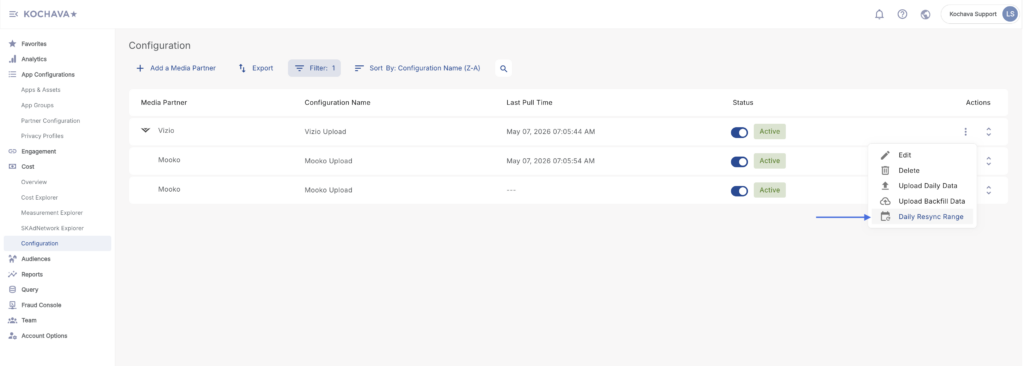
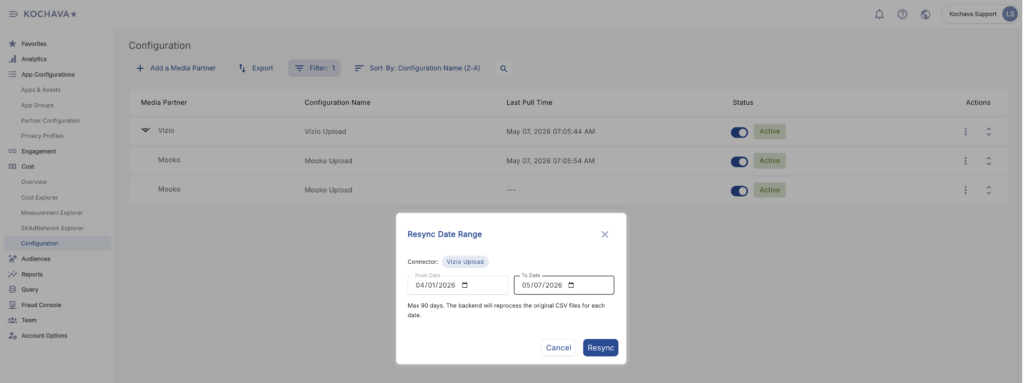
- You must explicitly utilize the “Daily Resync” action in the portal after uploading the updated dated file to force the restatement.
- Click on the Configuration Edit (⋮) button for the desired media partner.
- Select Daily Resync Range
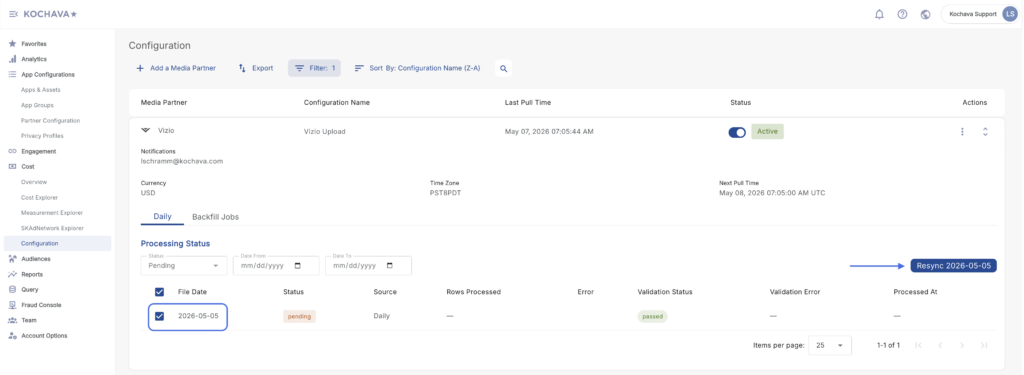
Status View Resync Initiation
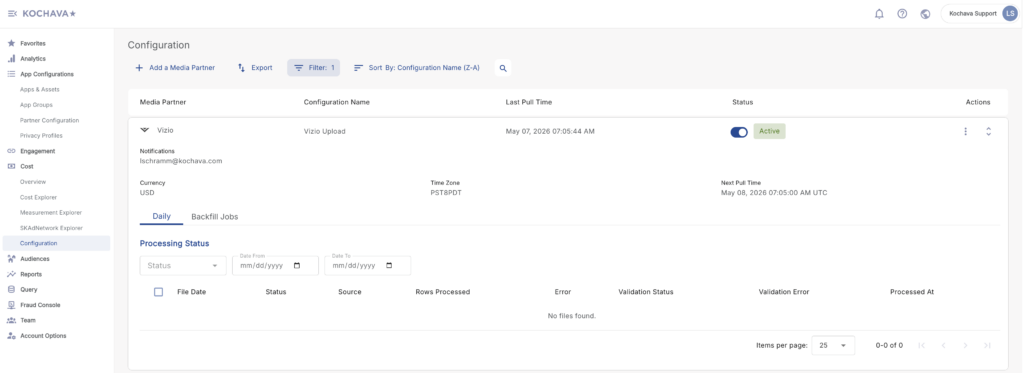
- Alternatively, you can trigger targeted resyncs directly from the Processing Status View:
Observability & System Monitoring
To ensure data fidelity and provide transparency, the connector portal includes a robust observability layer for customers and account managers.
- File-Level Tracking: Every uploaded file (both daily and backfill) is tracked with an explicit state: Pending, Processing, Success, or Failed.
- Error Logging: In the event of a Failed status, the UI exposes detailed error descriptions, enabling users to quickly identify and remediate formatting or data discrepancies before attempting a re-upload.